Context
Bsport is an all-in-one management platform for boutique fitness studios — bookings, members, payments, communications and connected apps in one place. Studio owners and front-desk staff spend their day jumping between those systems, and when something goes wrong they need to reconstruct what actually happened.

The product lives in the studio: front desk, teachers, members, and a back office that has to keep up with all of it.
Problem to solve
Account activity was scattered. A cancelled booking, a ClassPass check-in, a credit adjustment or an invoice change could live in different tools, with no single place to search, filter or explain the sequence. Support tickets piled up around “who did what, and when?” — and the existing log was too thin to answer that without digging.
The brief for Audit trail V3 was to make that history usable: one searchable, filterable trail that studio teams could trust, export, and query in plain language.
The product
Audit trail V3 is a working operations log for the studio account. It lists every relevant event with date & time, team member, category, action and item — so a cancelled class or an added pass credit is as easy to find as a payment.
- Filter and display controls — narrow the trail by category, person or time instead of scrolling a raw dump.
- Cross-system events — including automated activity from connected apps like ClassPass, not only actions taken inside Bsport.
- CSV export — for accountants, owners and anyone who needs the trail outside the product.
- Ask the trail — an AI query bar for questions in plain language: what happened last Tuesday, who cancelled a booking, when credits were added.
Audit trail V3 as a working prototype — filtering, search, CSV export, and the “Ask the trail” query bar, all functional on day one.
What we validated
The prototype ran against a live local environment and was used with real stakeholders before anything was rebuilt for production. That let the team pressure-test empty states, filter combinations, and whether “Ask the trail” returned answers people could act on — not just whether the layout looked right.
How it was designed
The AI design flow
This project was also a test of a leaner path from brief to a testable prototype: built in code with an AI pair-programmer, versioned in GitLab, and shared with real users before a single line of production code was written.
- Discovery & research — grounding the problem before any screen exists: existing research, prior art, support tickets, and usage data in a shared set of docs.
- Alignment with product — walking through the PRD with the PM to pin down requirements and negotiate scope.
- Rapid prototyping, in code, with AI — a static Figma pass settles layout where needed, but the prototype that gets tested is built with Cursor and pushed to GitLab. That branch spins up an ephemeral environment — a temporary, shareable, live instance — so reviewers react to a running interface, not a flat image.
- Validate with users — the environment’s link makes testing lightweight: no build step, no local setup, just a URL. Feedback goes back into the same branch.
- Handoff to engineering — because the prototype already lives in GitLab as real code, handoff is a continuation of the same merge request, not a separate export step.
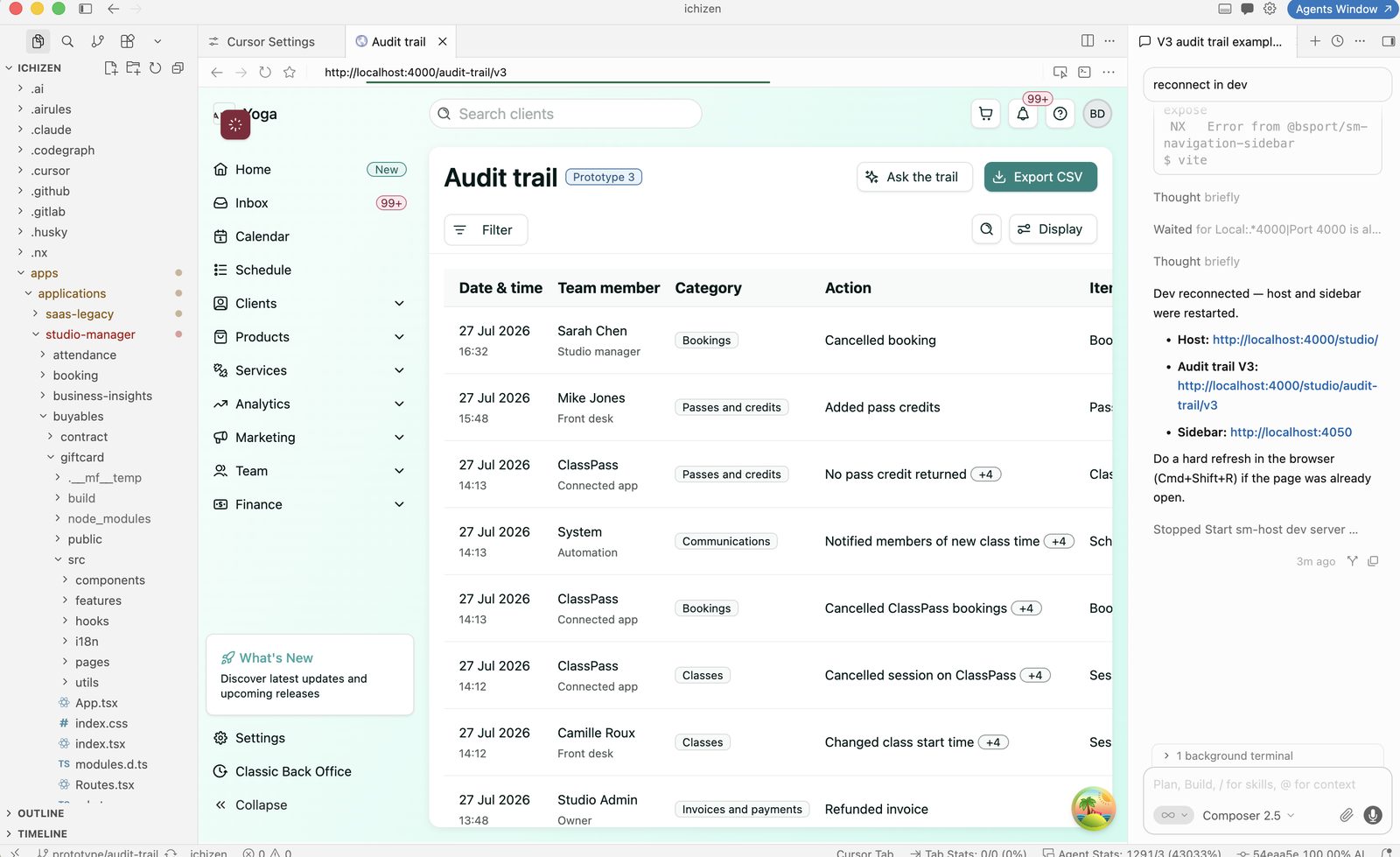
Cursor connected to the project repo, with Audit trail V3 running against the local dev environment — AI panel on the right coordinating the dev server.
Why this flow worked here
- Fewer translation losses — design intent survives handoff because it’s already expressed in code.
- Real feedback, earlier — stakeholders react to something that behaves like the product.
- One source of truth — the prototype, the review, and the eventual implementation share the same GitLab history.
- Shareable by default — ephemeral environments turn every prototype into a link anyone can open.